
S1 Game Review Guide: Download, Registration, Easypaisa, JazzCash and Withdrawals
November 8, 2026Size
24 MBVersion
V1.0.6 Requirements
Android Downloads
45kGet it on

Description
What is the S1 game?
S1 Game is presented online as a mobile gaming platform with a range of game options and account features. The site associated with S1 Game describes an Android app and provides information about registration, login, deposits, withdrawals, and games. The actual games and features available can depend on the app version, account, location, and current platform rules.
For players in Pakistan, Easypaisa and JazzCash are familiar payment services. You confirmed that both are available for S1 Game deposits and withdrawals. Check the payment screen in your own account before sending money, because methods, limits, and instructions can change.
This guide explains what to look at before downloading an APK, how to approach registration, how to use the cashier carefully, and what to know about responsible play. It is written to help readers make informed choices—not to suggest that gambling is a reliable way to earn money.
For more mobile-app articles, visit APKSlotsGames.pk. You can also browse its sections for the latest APKs, popular APKs, and updated APKs. Link to a specific S1 game download page only if you have checked that the file is current and comes from a source you trust.
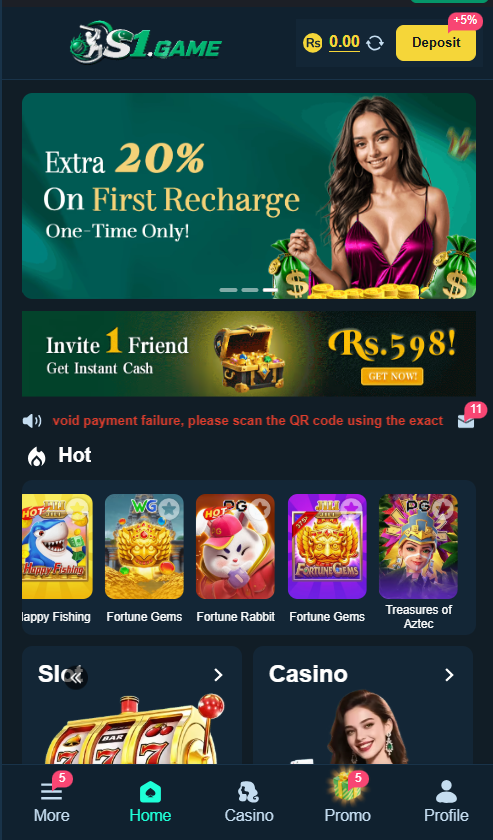
S1 Game features at a glance
Features may change, so use the app and its terms as the current reference. The table below separates what this guide covers from what you should verify directly.
| Feature | What to know |
|---|---|
| Mobile access | S1 Game is presented as a mobile gaming platform. Check the latest supported version and device requirements before installing. |
| Game selection | The site describes multiple game options. Check the live lobby for the games currently available. |
| EasyPaisa | You confirmed it is available for deposits and withdrawals; follow the instructions shown in your account. |
| JazzCash | You confirmed it is available for deposits and withdrawals; verify wallet details before confirming a transaction. |
| Registration and login | Use the platform’s current sign-up and account-recovery instructions. Protect your password and verification codes. |
| Withdrawals | You described withdrawals as fast. Individual processing can still vary due to verification, platform procedures, or wallet-provider processing. |
| APK installation | Download only from a source you can verify. APK files from unknown websites may pose security risks. |
| Promotions | Read the full terms before accepting an offer or joining an event. |
A feature list is not a guarantee that every feature is available to every user. Account eligibility, location, app version, and the platform’s current rules can all matter.
Games and entertainment options
The available game library is one reason people look at mobile gaming apps. Since game menus may be updated, open the S1 Game lobby to see the current catalogue and read the instructions for each game before playing.
If a game involves betting, cards, a multiplier, or a prize, take a moment to understand the rules and the stakes. Don’t assume two games with similar names have identical rules. Check how results are determined, what choices are available, and how any displayed payout information works.
A game’s past results do not reliably predict the next result. Avoid systems that claim to guarantee wins or recover losses. If you choose to play, treat it as entertainment and decide on a budget before you start.
S1 Game download: how to approach an APK safely
An APK is an Android installation file. Apps distributed outside an app store require extra care: a file’s name, icon, or promotional page does not prove that it is genuine or safe. Confirm the publisher and the download source before installing anything.
The S1 Game information page found online is at s1game.com.pk. Check the domain and the operator details carefully before treating any page as an official source. Do not rely on an unrelated mirror or an APK link forwarded through a chat group simply because it uses the S1 name.
Android download and installation steps
| Step | What to do |
|---|---|
| 1. Verify the source. | Start from a website or app listing you can independently confirm. Check the domain, publisher details, and version information. |
| 2. Download the file. | If you decide to proceed, download the APK directly from the source you verified. Avoid “modified,” “unlocked,” or “guaranteed earning” versions. |
| 3. Review the file. | Check the file name and version, and pay attention to Android’s security warnings. Stop if anything seems inconsistent or suspicious. |
| 4. Allow installation only if necessary. | Android may ask you to permit installation from the specific browser or file manager. Enable this only if you trust the file and source. |
| 5. Install and review permissions | Follow the device prompts, but do not grant permissions that seem unrelated to the app’s purpose. |
| 6. Turn off the permission again. | If you enabled installation from an outside source, consider disabling it after installation. |
| 7. Check the app after opening. | Confirm the app displays the expected name and interface. Don’t enter payment or personal details if the app or login page looks suspicious. |
Android menu names differ by device and version. If you are unsure about a warning or permission, pause instead of bypassing it. Google recommends using trusted app sources and offers Google Play Protect to help check apps for harmful behaviour; no security measure can eliminate every risk.
iPhone users: APK files are designed for Android. If you use an iPhone, use only an access method the service officially supports. Don’t install unknown configuration profiles or share Apple account credentials to get access.
How to register on S1 Game
Registration screens and required details may change. Use the sign-up option on the website or app you have verified, and read the terms before creating an account.
| Step | Registration guidance |
|---|---|
| 1. Open the verified platform. | Check the address before entering personal information. Avoid sign-up links from unknown messages. |
| 2. Select Register | Use the registration option shown by the platform. |
| 3. Enter accurate details. | Provide only the information requested and ensure it is correct. |
| 4. Create a strong password. | Use a unique password that you do not use for email, banking, or other accounts. |
| 5. Complete verification | Follow the in-app instructions. Never share a one-time code with another person. |
| 6. Review the terms. | Check eligibility, account rules, privacy information, and payment conditions. |
| 7. Secure your account | Keep your phone and email secure, and review any account-security settings available. |
Don’t create an account if you are under the legal age or if the service is not allowed in your location. If the platform requests identity verification, submit information only through a channel you have confirmed belongs to the operator.
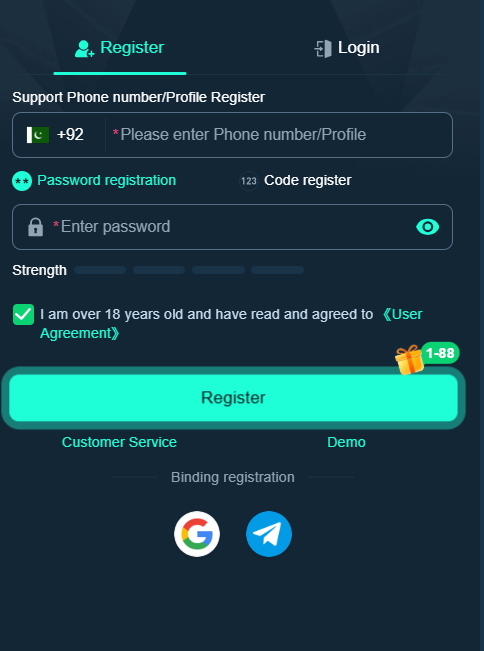
S1 Game deposits with Easypaisa and JazzCash
You confirmed that Easypaisa and JazzCash are available deposit options on S1 Game. These wallets may be convenient for users who already use them, but always check the live cashier for the method shown on your account and the current payment instructions.
Deposit checklist
| Before confirming a deposit | Why it matters |
|---|---|
| Open the cashier from your signed-in account. | This helps you avoid payment instructions sent by an impersonator. |
| Select the method shown by the cashier. | Available payment methods can change. Don’t assume an old screenshot is current. |
| Check the wallet details and amount. | A typo or incorrect recipient may delay or misdirect a payment. |
| Review fees and limits | The platform or payment provider may display conditions before confirmation. |
| Use a wallet you control. | Never pay through a stranger’s account or share your wallet PIN. |
| Save the transaction reference. | Keep the receipt until the deposit is reflected correctly. |
If the payment screen and a message from someone claiming to be support give different details, stop and contact support through the platform’s verified contact channel. Never share a password, wallet PIN, or one-time verification code.
For information about the payment services themselves, visit the official Easypaisa and JazzCash websites. These external links explain the wallet providers; they do not replace S1 Game’s own cashier instructions.
How to withdraw from S1 Game
You confirmed that withdrawals are available through Easypaisa and JazzCash and described the process as fast. A particular request may still take longer due to account checks, incorrect details, platform review, or processing by the wallet provider. Check the withdrawal status and current terms in your account rather than relying on a fixed time claim.
Withdrawal checklist
| Step | Action |
|---|---|
| 1. Sign in through the verified app or website. | Avoid withdrawal links sent by unknown accounts. |
| 2. Open the withdrawal section. | Review the available methods and any current instructions. |
| 3. Choose Easypaisa or JazzCash. | Select only a method displayed as available for your account. |
| 4. Enter your own wallet information carefully | Check the number and account details before submitting. |
| 5. Review the request. | Confirm the amount and any conditions shown on screen. |
| 6. Save the confirmation. | Keep the reference number or screenshot for your records. |
| 7. Check the status. | If there is a delay, contact support using the verified channel and provide the reference—not your secret credentials. |
If you have accepted a bonus or promotion, review its terms before requesting a withdrawal. Some offers may have eligibility or play-through conditions. Don’t pay an unexpected release fee to a person who contacts you privately and claims they can unlock a withdrawal.
Promotions, bonuses and events
Promotions can look appealing, but the headline alone may not explain the full rules. Before opting in, check who is eligible, whether a deposit is required, when the offer expires, which games count, and whether additional conditions apply before withdrawing.
Treat a bonus as optional. Don’t deposit more than you planned just to qualify, and don’t accept an offer if you cannot understand its conditions. If the terms are unclear, ask support through the platform’s verified channel or skip the offer.
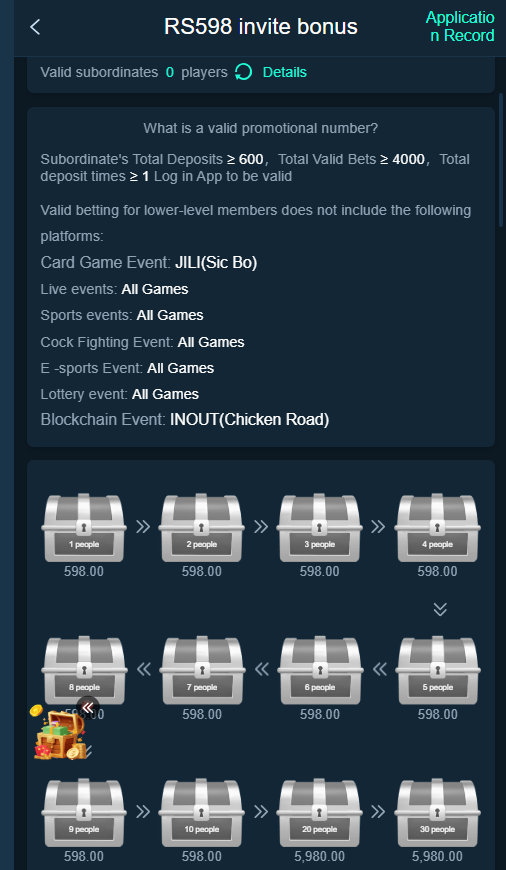
Pros and things to consider
Potential conveniences
- Multiple game options: Players can browse the games currently listed in the platform.
- Local wallet choices: You confirmed Easypaisa and JazzCash are available for deposits and withdrawals.
- Mobile access: The service is presented as mobile-friendly, though performance depends on the phone and connection.
- Account access: Registration and login are available through the platform’s current account flow.
- Withdrawal requests: You described the withdrawal process as fast; individual processing can vary.
Important considerations
- Winnings are not guaranteed: Players may lose money, and no system guarantees profit.
- APK sources need checking: Installing an unverified file may put your device or information at risk.
- Rules differ by game: Read the instructions and stakes before playing.
- Payments require attention: Confirm recipient details and save transaction records.
- Terms can change: Recheck cashier conditions, promotions, and app information.
- Local laws vary: Confirm that online gambling is legal for you and meet the age requirement.
Tips for safer, more informed play
Set a budget first
Decide how much you can afford to spend on entertainment before opening a game. Don’t use money needed for daily expenses, bills, debt repayments, or savings goals. Once you reach your limit, stop.
Keep track of deposits and withdrawals
A simple record of deposits, withdrawals, and time spent can help you stay aware of your activity. If you notice that you are depositing more than planned or trying to win back losses, take a break.
Don’t chase losses
A previous loss does not make a win due. Increasing a stake or depositing again to recover a loss can lead to larger losses. Step away rather than continuing when you feel pressured or upset.
Protect your account and wallet
Use a unique password, keep your phone secure, and never disclose your PIN or one-time codes. If an app requests unusual permissions or a support contact asks for credentials, stop and verify before proceeding.
Check offers before accepting them
Read the full rules for a promotion, tournament, or referral offer. Don’t rely on a banner or a short description as the complete terms.
Google-friendly publishing: make the page useful, not spammy
There is no guaranteed way to rank a blog post in Google. A strong page should help readers make informed decisions, provide original value, and be clear about what has and has not been independently verified. Google’s guidance focuses on creating helpful, reliable, people-first content. Its spam policies also caution against tactics such as scaled low-value pages and manipulative link schemes.
For this article, consider these publishing practices:
| Practice | Recommendation |
|---|---|
| Be transparent | Identify the author or reviewer and explain whether the app or payment process was personally tested. |
| Avoid unsupported claims | Don’t promise “guaranteed earnings,” “instant withdrawals,” or a verified licence unless you can substantiate the claim. |
| Use natural keywords | Include “S1 Game review” where it fits, but don’t repeat phrases unnaturally. |
| Add relevant internal links | Link to genuinely useful pages on APKSlotsGames.pk, not unrelated pages just to add links. |
| Choose useful external sources | Link to official Easypaisa, JazzCash, Android safety, and Google Search guidance where they help readers. |
| Label commercial links | If a link is paid, sponsored, or affiliate-based, disclose that relationship and use appropriate link attributes such as rel="sponsored" where applicable. |
| Keep the page maintained | Recheck payment options, app version, and terms before updating the article date. |
Backlinks should be earned through useful information and genuine editorial relationships—not bought, exchanged at scale, or inserted into unrelated pages. Adding links alone does not make a page trustworthy or guarantee better search visibility.
Image suggestions for a fast-loading article
Use original screenshots only if you have permission and they show the current interface. Compress images and use WebP or AVIF where supported. Avoid adding decorative images that slow the page without helping readers.
| Image placement | Suggested filename | Suggested alt text |
|---|---|---|
| Near the introduction | s1-game-review.webp | “S1 Game mobile platform overview” |
| In the download section | s1-game-apk-install-guide.webp | “Android checklist for installing an app safely” |
| In the payment section | s1-game-easypaisa-jazzcash-guide.webp | “Payment method checklist for Easypaisa and JazzCash” |
Use descriptive alt text that explains the image. Don’t stuff keywords into alt attributes, and don’t use an image as a substitute for clear written payment instructions.
Final thoughts
S1 Game offers a mobile gaming experience with multiple game options. You confirmed that Easypaisa and JazzCash can be used for deposits and withdrawals, and that withdrawals are generally fast. These payment options may be convenient, but players should still check the current cashier instructions and keep a record of each transaction.
Before downloading, verify the app source and review Android security prompts. Before registering, read the terms and check local age and legal requirements. Before playing, understand the game rules and set a budget. No game should be treated as a dependable income source, and no article can guarantee a particular result.
Frequently asked questions
What is S1 Game?
S1 Game is presented online as a mobile gaming platform with multiple game options and account features. Check the current lobby and terms to confirm what is available to you.
Can I deposit with Easypaisa or JazzCash?
You confirmed that both payment methods are available. Check the live S1 Game cashier for current instructions, limits, and any conditions before paying.
Can I withdraw to Easypaisa or JazzCash?
You confirmed that withdrawals through Easypaisa and JazzCash are available. Processing can vary, so follow the status in your account and contact verified support if you need help.
Is an APK safe to install?
An APK is not automatically safe just because it has the app’s name or logo. Verify the source, review Android warnings and permissions, and avoid modified or unofficial files.
Does S1 Game guarantee earnings?
No game or strategy can guarantee earnings. Casino and betting games involve risk, and you may lose money. Play only for entertainment and within a limit you can afford.
How do I get help with a payment?
Use the support channel shown on the platform you have verified. Provide relevant transaction details when asked, but never share your password, wallet PIN, or one-time code.